Category: Technology

  • How many people does it take to operate a data center?

    It looks like the big tech companies are building new data centers like there is no tomorrow.

    A few years ago, it was all about cryptocurrencty. And it should be noted that some of these data centers were not of the highest standard. Just look at the images in this article (in norwegian).

    Nowadays the pressure is on again, this time because of Artificial Intelligence (AI). And, like cryptocurrency, they need a lot of electicity. In return they promise jobs.

    But I have a hard time believing that data centers will employ as many people as these companies claim. Nscale are promising 200 jobs (in norwegian) once their new data center is operational.

    And, maybe 200 people in total is needed to run what they plan to be Europes biggest data center for AI, but I doubt it, and I think most of them would be remote jobs anyway. So much so that I would say that whomever works at the data center is the remote worker.

    What they need is this: cooling technician, electrician, someone to do basic maintenance and a couple of data technicians to install and remove servers. And maybe some on-site security, depending on location. Did I forget anyone?

    What is interesting is that acording to this article (again in norwegian), Green Mountain, in 2020, estimated that a new data center in Norway could employ 8 300 people. But then 3 years later, in 2023, it was adjusted down to 500 jobs. And this data center would be smaller than Nscale’s, which promised 200 jobs.

    I can only assume that the 8 300 jobs mentioned was during construction, and not during regular operation. Anything else would just be absurd.

    Asking Googles AI about how many (people) does it take to operate a data center, the answer is: “Operating a typical data center requires a surprisingly small core staff—often ranging from 25 to 150 permanent workers

    Then again, we are talking about AI data centers, so maybe most of these jobs will be people with wire cutters. Ready to take down any rogue AI agent.
  • Understanding your business

    There are many interesting new technologies out there. And as a manager, you may want to attract and hire developers with these skills.

    But while doing this, you may have forgotten what actually keeps the light on; a codebase written in C that only one person knows.

    No amount of front end developers will help once this person is gone.

    By always prioritizing — and internally praising — new initatives, you are communicating that the core business is not imporant.

    So, as a manager, make sure you understand the business you are in. Whether you know it or not, you are responsible that the legacy codebase gets the love and care it needs.

    It doesn’t help if your product can integrate with a thousand other platforms if your backend isn’t running.

  • Pay close attention to your network headers

    Summary: BIG-IP from F5 does not seem to honor the “Expect: 100-Continue” header by default, and changes must be made on the F5 appliance.


    Recently, an network application, which have worked since 2017, stopped working. The application is straigh forward enough. It checks if a service is working by doing (mainly) two things:

    1. Perform a “GET” using HTTP/1.1 to check for status 200
    2. Authenticate using Oauth 2.0 and receiving an access_token

    After a change was made to the endpoint, switching to BIG-IP from F5, the second step failed. Running the program in Visual Studio produced the following error message:

    The underlying connection was closed: An unexpected error occurred on a receive.

    Searching for this error message will provide you with a lot of various suggestions, mostly related to the TLS protocol.

    When I upgraded the project from .Net 4.8 to .Net 8.0, it started working. One difference I saw during the debugging was the headers sent by the application.

    Header sent using .Net 4.8:

    Content-Type: application/x-www-form-urlencoded
    Host: example.com
    Content-Length: 118
    Expect: 100-continue
    Connection: Keep-Alive

    Header sent using .Net 8.0:

    Content-Type: application/x-www-form-urlencoded
    Content-Length: 118

    A quick Google search on the phrase “Expect: 100-continue fails on F5” produced both an explanation and a fix. The short answer is that while the client is waiting for a “100 Continue” message, the F5 device is wating for more data.

    References:

    • https://my.f5.com/manage/s/article/K94382824
    • https://developer.mozilla.org/en-US/docs/Web/HTTP/Status/100
  • IPv6 on OpenWRT and Altibox

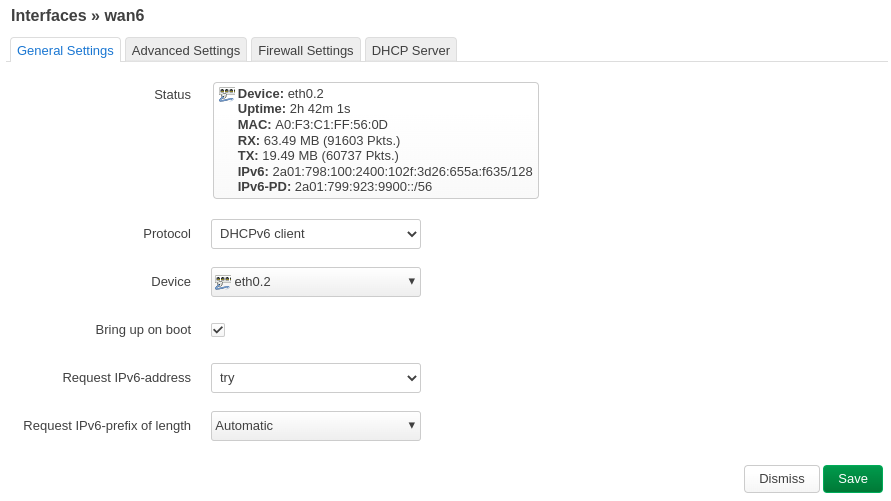
    I spent too much time getting IPv6 to work on OpenWRT (version 22.03.5) and Altibox, my local ISP. The first issue was getting an IPv6 address in the first place, but that seems to just have fixed itself and I have no idea why. The second issue was to get OpenWRT to hand out IPv6 addresses to the clients on my network. I tried this guide from Nils Norman Haukås (in Norwegian), but that did not help in this case.

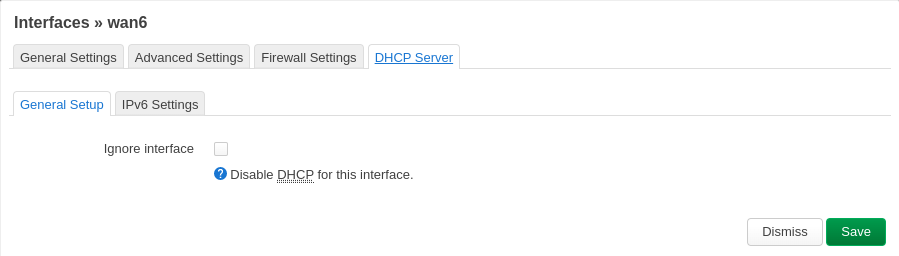
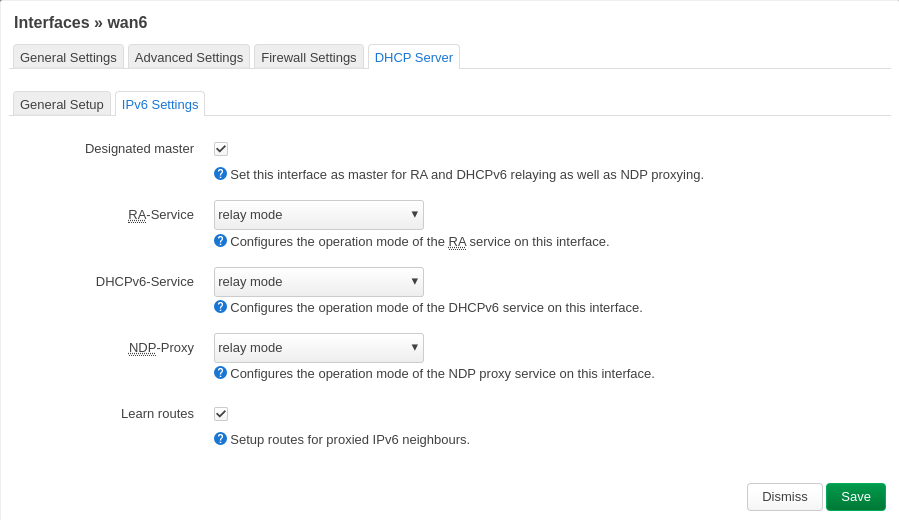
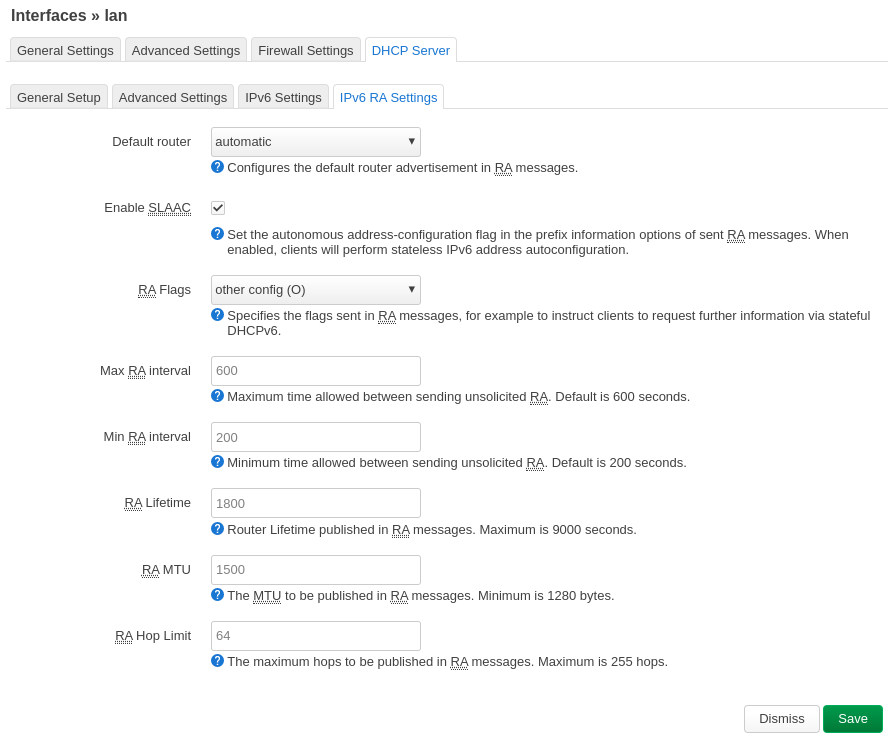
    So below is just a ton of screenshots in case I need to do this again at some point in the future. Or maybe it will help you. At this point you should have a working IPv6 address on the wan6 interface.

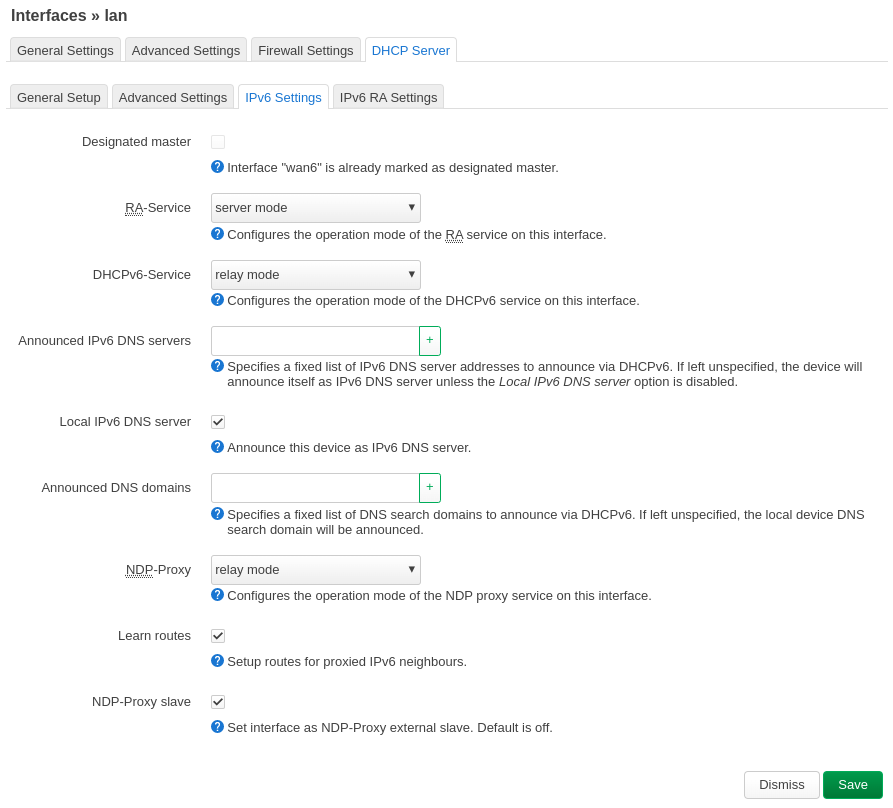
    DHCP Server for LAN (IPv6)

    Go to “Network->Interfaces” and select “Edit” on the lan interface and verify the following under IPv6 Settings. When you set RA-Service to “server mode” a new tab will show up called IPv6 RA Settings.

    Interface Settings for WAN6

    Click on “Save & Apply” on the main interface tab (Network->Interfaces).

  • This blog is IPv6 accessible

    Unless it isn’t. In which case you will not be able to read this.

    The reason for the above statement is as follows: if you are using IPv6, your computer will resolve this domain name using the AAAA record of the Domain Name System (DNS), which currently points to this blog. If my blog no longer has this IPv6 address, the AAAA record will be void and your browsers request will fail.

    Why would this blog no longer have this IPv6 address? Well, here is the thing: I currently host my own webserver. I pay my internet service provider (ISP) a small fee for a fixed IPv4 address, and my domain name points to this address (in the IPv4 world.) When I configured IPv6, I found that my ISP gives me a new IPv6 block each time I press the “renew” button on my router.

    Wait? You said you pay for one IPv4 address, but you get a block of IPv6 addresses just like that? How much of a block are we talking about?

    The IPv6 space is so vast I get not only one address, nor two, but a small block. How small? 18,446,744,073,709,551,616 addresses to be exact. Which means I can probably give all of my dust bunnies their own IP address, and their own blogs, I guess. Wonder what they would write about…

    I digress. Back to the first line. I am one power cycle away from getting 18,446,744,073,709,551,616 new addresses to play with. No need to memorize them, that’s for sure. And when (not if) that happens, the current AAAA record will guide all the IPv6 enabled devices on a hunt for my webpage where it does not exist. Guess I should talk to my ISP about getting a fixed set of addresses.

    I wonder which fee they would charge for a /64 block of IPv6 addresses. Even if it is just 1/10th of the price I pay for my one IPv4 address today, I could not afford it.